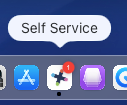
Open up Self Service app (either on your dock or in your applications folder)
Then click Uninstall PaperCut Client, wait for the ball to stop spinning (and your green printer icon to vanish)



Modified on: Tue, 1 Sep, 2026 at 10:50 AM
Did you find it helpful? Yes No
Send feedback